Diamond Decks
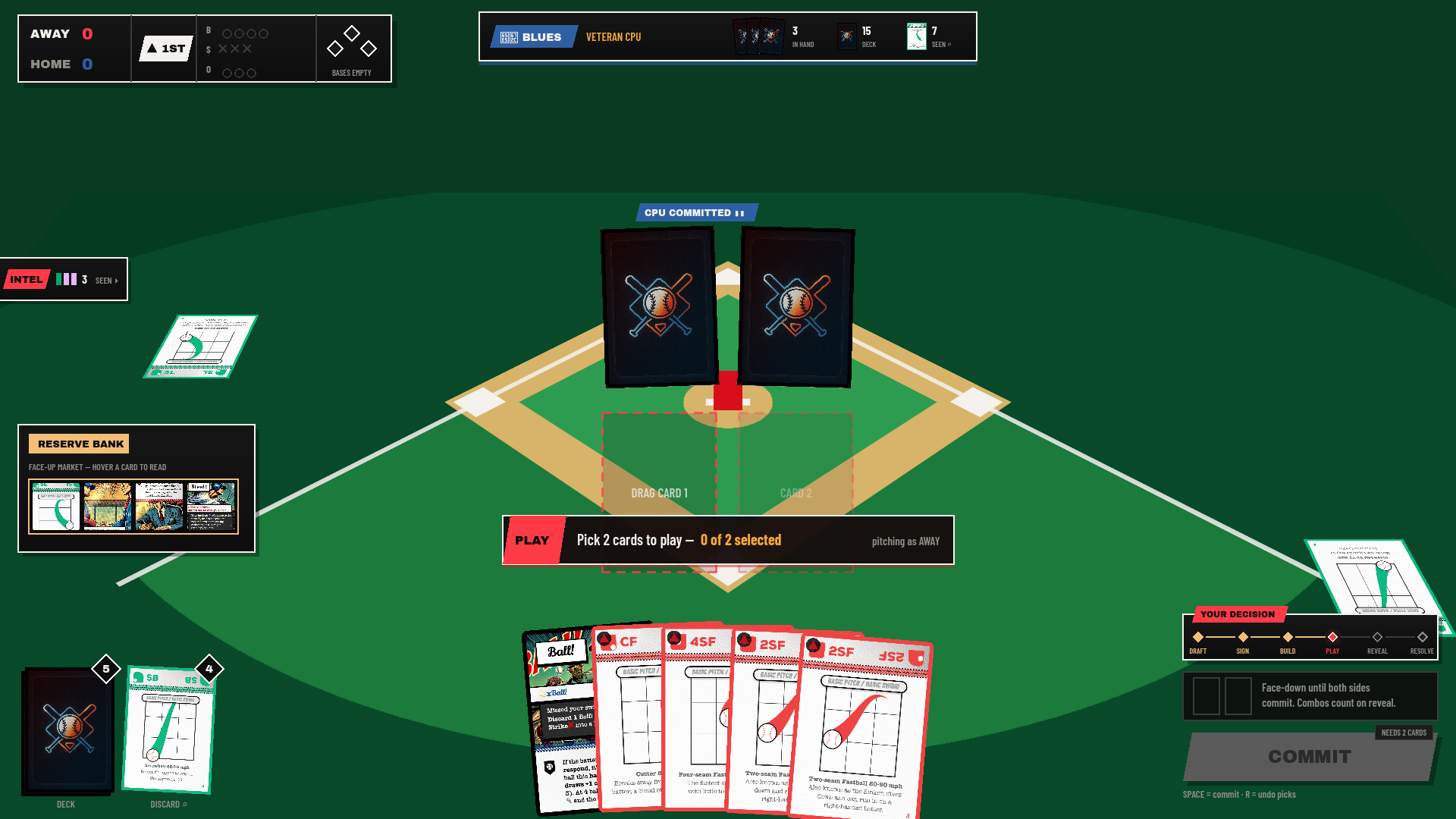
A baseball card game where the batter wants matches and the pitcher wants misses. Both sides commit two cards face down, all four flip at once, and the number of matching quadrants and colours decides whether anything happens at all.
Docs/README.md · GDD-v7.md · GDD-v7-BOARDGAME.md · src/engine/ · assets/
Why this wiki exists. This documentation hub serves two primary functions:
- Single Source of Truth: Answers "what are the rules, how does the engine work, and what is in the box", transcribed directly from the engine code and shipped assets.
- Interactive Working Workbench: Provides live interactive test environments to decide interface and motion design. The Animation Lab runs candidate timings side by side at 1×, ½×, and ¼×, while UI/UX Proposals mounts 1:1 interactive HUD mocks so design debates are settled by looking rather than debating.
Documentation Directory & Hub
Explore the full 10-page Diamond Decks documentation suite. Every page is self-contained, requiring no build step, server, or internet access.
The game in one minute
- Both sides commit 2 cards face down. The pitching side must include at least one basic pitch card, or the batter is walked.
- All four flip simultaneously. Count combinations across the 2 × 2 cross-product: one for every quadrant that matches, one for every pitch family that matches.
- Fewer than 2 combinations is a strike. Two or more is a hit, and the batter rolls
combinations − 1red offensive dice (capped at 5). - Dice have fixed faces. Red (Offense): HOMERUN ×1, "+" ×1, blank ×4. Blue (Defense): OUT ×1, HALF-OUT ×1, blank ×4. Nothing in the game ever changes a face — only how many dice you roll.
- Resolve in canonical order: Home Run → Defense Stops → Eliminations → Base Runner Advance. Three strikes is an out, three outs ends the half-inning, highest run total after six innings wins.
Three products, one engine
The Diamond Decks codebase implements three distinct game experiences on top of a single unified rules and simulation core (src/engine/):
| Product Mode | Primary Scene | Architecture & Purpose |
|---|---|---|
| Boardgame / 1 vs CPU | scenes/match.tscn |
The complete rules experience: six innings, drafting phase, card allocation, and the mill. Serves as the high-fidelity digital rehearsal of the physical tabletop game. |
| Roguelike Road Trip | scenes/rogue.tscn |
Single-player progression run. The player only bats; target scores climb dynamically; the mound and bullpen represent the run's health pool. Also serves as an engaging extended tutorial. |
| Interactive Tutorial | scenes/tutorial.tscn |
Step-by-step interactive onboarding: teaching quadrant matching, then colour families, then dice mechanics, and finally special interrupt cards. |
Repository architecture: Where things live
The project follows strict separation of concerns. The rules engine contains zero Godot scene nodes and can run completely headless in automated test suites and simulation sweeps.
src/engine/    The deterministic rules engine. No Godot nodes, no UI. Headless-testable.
src/agents/    Decision boundary seam: HumanAgent suspends execution, AiAgent resolves immediately.
src/ui/        2D HUD widgets, design system tokens (palette.gd, ui_fonts.gd), and layout anchors.
src/world3d/   3D table environment: procedural field painter, camera rig, 3D dice, meeples, card quads.
src/app/       Application shells and scenes wiring engine sessions to views and screen controllers.
assets/cards/  45 card illustrations + shared card back texture (shipped game assets).
assets/dice/   6 die-face textures (3 offensive red faces, 3 defensive blue faces).
assets/fonts/  Shipped game typography (ArchivoBlack, BarlowCondensed variants).
tests/         Engine parity fixtures, rules unit tests, Monte Carlo simulation sweeps, screenshot harness.
Docs/          Self-contained HTML wiki, working sessions (anim-lab, ui-proposals), and documentation.
gauntlet/      Blind visual critique loop comparing live build crops against Figma mockups.
Asset pipeline & zero-build architecture
- Direct Asset Reading: Card illustrations, die faces, and TTF font binaries are loaded directly from
../assets/via relative paths. When artists update card art or fonts in the game, the wiki reflects the new art immediately. - Zero Duplication: No image or asset is ever re-exported, copied, or transcoded for the documentation.
- Dynamic Base Path Resolution:
assets/data.jsdynamically resolves its asset root usingdocument.currentScript.src, allowing pages to function seamlessly from both the root (Docs/index.html) and nested page directories (Docs/pages/*.html). - 100% Offline & Self-Contained: Zero external CDN links, zero Node.js dependencies, zero internet access required. Double-click
Docs/index.htmlto open in any modern browser.
Maintaining data synchronization
1 · Card and Config Data (Transcribed in assets/data.js)
When game rules, card sets, or configuration constants are modified in GDScript, update the JSON mirrors in assets/data.js from the following source files:
src/engine/card_sets.gd— Card definitions, set compositions, quadrant locations, and copy counts.src/ui/card_art.gd— Card art manifest and illustration file associations.src/ui/card_inspect.gd— Canonical rules text, effect triggers, and flavor copy.src/engine/rules_config.gd&src/engine/rogue_config.gd— Gameplay balancing constants and configuration defaults.src/engine/rogue_engine.gd— Playable batter characters, bullpen relief arms, and CPU archetypes.
2 · Visual Screenshots (Automated Capture Harness in assets/shots/)
The screenshots embedded across the interface pages are generated programmatically by the project's own Godot test harness. Regenerate the full asset suite after any HUD or 3D table change with:
DD_SHOT_DIR=Docs/assets/shots /Applications/Godot.app/Contents/MacOS/Godot \
  --path . --resolution 1920x1080 --position 4000,4000 \
  -s res://tests/ui_shot_match.gd
Execution Requirements: The harness must run non-headless because it requires active GPU rendering to capture framebuffers. The --position 4000,4000 argument parks the window off-screen so test execution does not steal desktop focus.
The two working sessions
Animation Lab
Focus: How the interface moves. Interactive motion workbench comparing animation timings and feel.
UI/UX Proposals
Focus: What is on screen and where. Layout, information density, and accessibility decision system.